
Dynamic Menu WordPress Plugin for Easy Navigation
Auto-Generate Dynamic Menus for WordPress
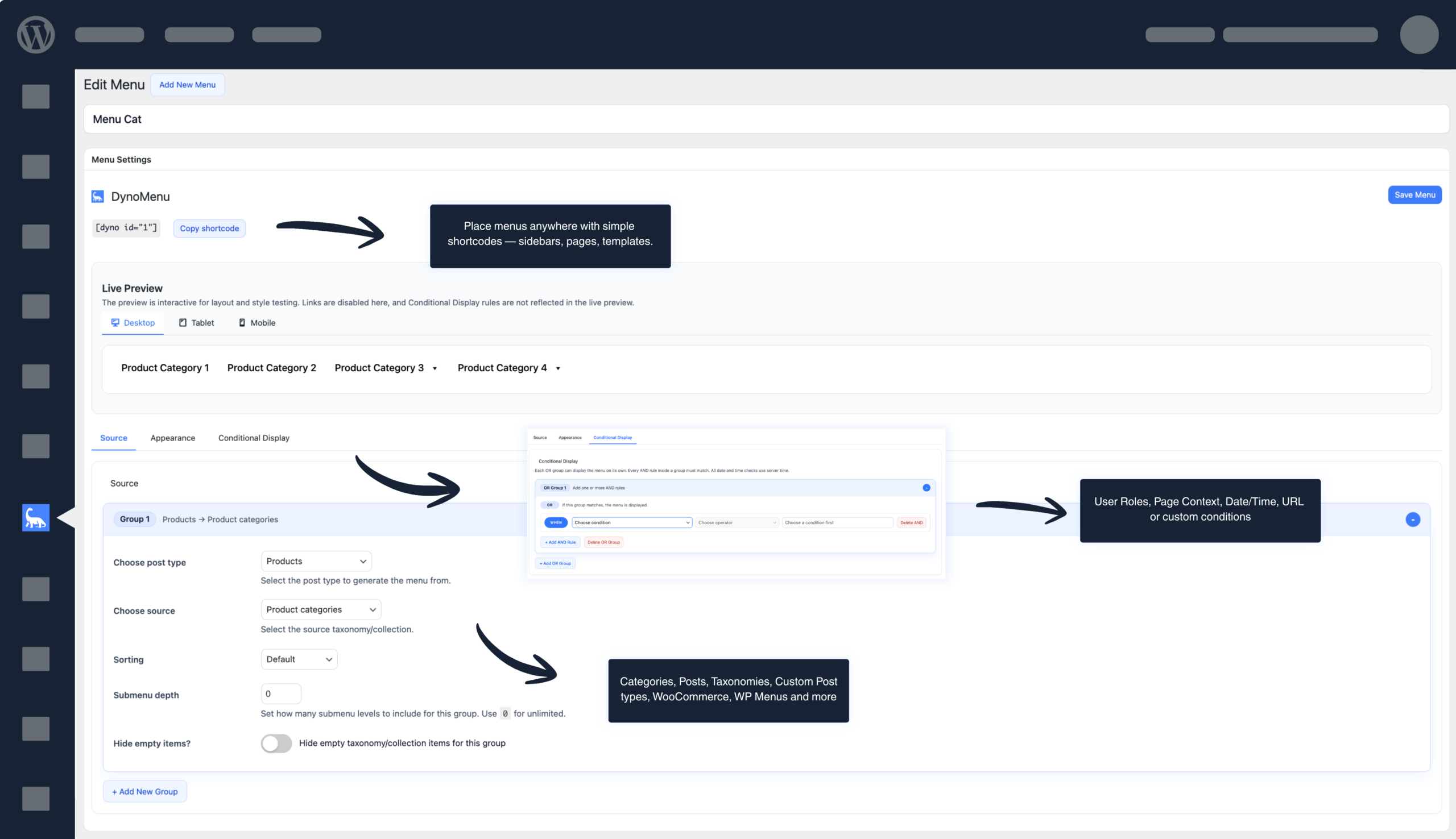
Build responsive, customizable navigation from your categories, posts, and taxonomies — in minutes, without code.
Features
Built for Every WordPress Site
Powerful options, zero complexity. Build menus that update themselves as your content grows.
Auto-Generate Menus
Pull from categories, posts, taxonomies, or existing WP menus automatically.
WooCommerce Ready
Generate menu from product categories and WooCommerce taxonomies instantly.
Responsive Menus
Built-in hamburger toggle with configurable breakpoints, icons, and overlay styling.
Live Preview
See changes in real time across desktop, tablet, and mobile breakpoints.
Full Style Control
Customize typography, colors, spacing, borders, and hover effects visually.
Conditional Display
Show or hide menu items based on user roles, page context, or custom conditions.
Shortcode Support
Place menus anywhere with simple shortcodes — sidebars, pages, templates.
Import / Export
Migrate menus between sites easily with one-click import and export.
Content Control
Hide specific menu items from WP Auto Menu with one click.
Stop Wasting Time on Manual Menus
WordPress menus break every time you add a category or product. DynoMenu fixes that.
Without DynoMenu
- Manually add every new category and page to your menu
- Menus become outdated and disorganized
- No responsive mobile menu without custom code
- Styling requires CSS knowledge or expensive plugins
- No way to conditionally show/hide menu items
With DynoMenu
- Menus auto-update when you add categories or products
- Navigation stays organized and current automatically
- Built-in responsive hamburger menus for mobile
- Visual styling controls — no CSS needed
- Conditional display rules for any page or user role
Use Cases
Built for Every WordPress Site
From small shops to large agency builds — DynoMenu adapts to your workflow.
eCommerce Stores
Auto-populate navigation from WooCommerce product categories as your catalog grows.
Content-Heavy Blogs
Keep menus current with auto-generated links to post categories and tags.
Agency Client Sites
Ship polished navigation faster with reusable import/export and shortcodes.
Membership Sites
Show different menus to different user roles with conditional display rules.
Pricing
Stop Wasting Time on Manual Menus
WordPress menus break every time you add a category or product. DynoMenu fixes that.
Free
$0 / forever
Great for a single menu on personal sites.
- Auto-generate Dynamic Menus
- 1 menu
- 1 groups per menu
- Shortcode Support
- Live Preview
- Responsive Menus
- Limited Styling customization
- Conditional display logic
- Export & Import Menus
- Hide-from-menu controls
- Priority support
Pro
$39 / year
$99 / year
$199 / year
Unlimited everything for growing stores & sites.
- Auto-generate Dynamic Menus
- Unlimited menus
- unlimited groups per menu
- Shortcode Support
- Live Preview
- Responsive Menus
- Full Styling customization
- Conditional display logic
- Export & Import Menus
- Hide-from-menu controls
- Priority support